Prepare
Website and programme
Block-built pages, a filterable programme, workshops with limited seats.
Build your event website, open registration, welcome participants with a QR code and run the room like a live show. No developer needed, in seven languages.
Pick an answer to vote.
Demo: your vote stays in your browser, nothing is saved.
From the first draft to the last vote, the same tool stays with you.
Website and programme
Block-built pages, a filterable programme, workshops with limited seats.
Form and badges
Your own fields, a capacity, and a QR code badge sent by email.
QR code check-in
One scan on any phone, and the present count updates live.
Polls, questions, live
The room votes, asks questions and follows the live stream, on site or remotely.
Three dashboard screens, as an organizer sees them. The data comes from a demonstration event.
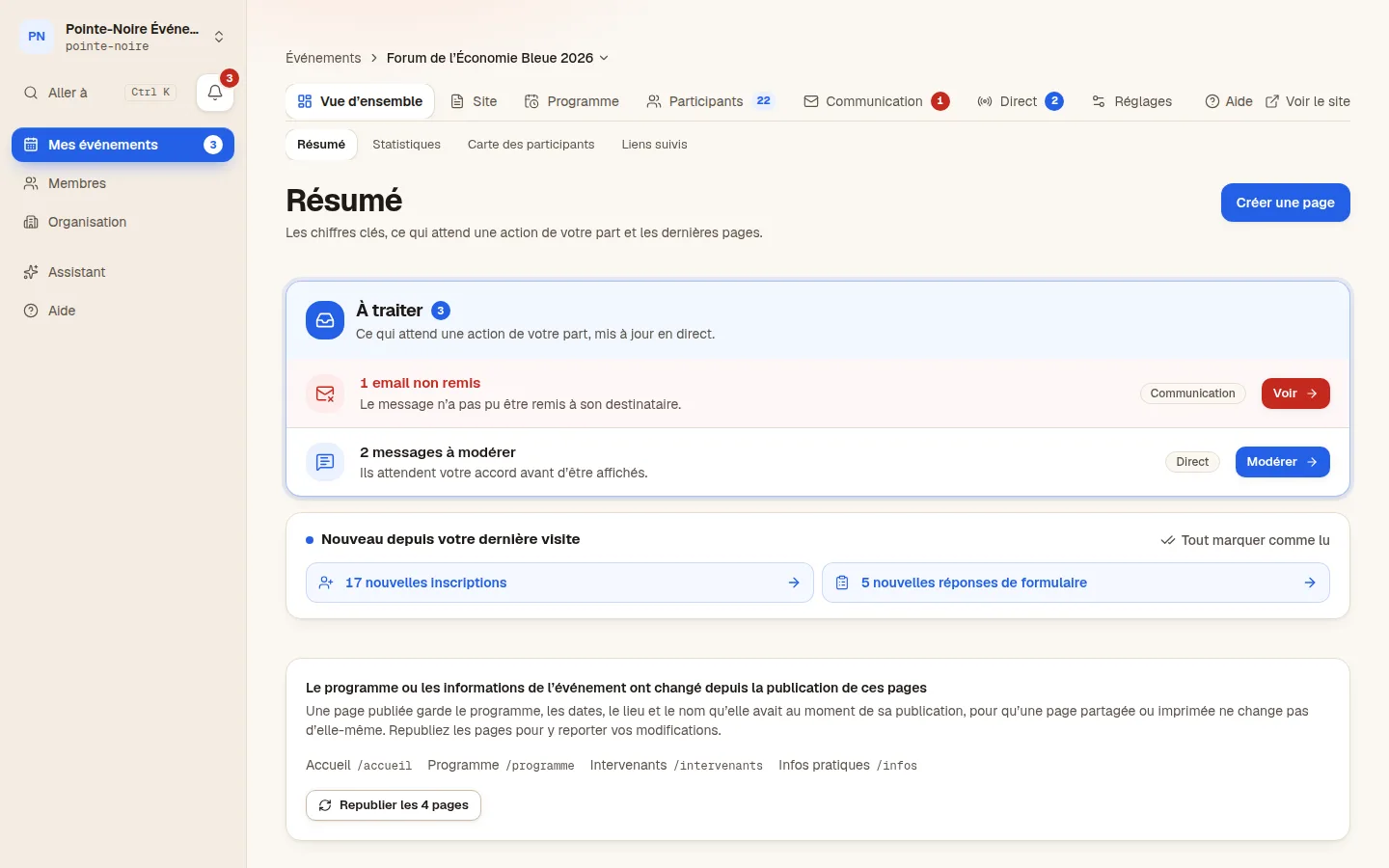
Overview. What needs an action, the event’s figures and the steps left before opening, on a single screen.
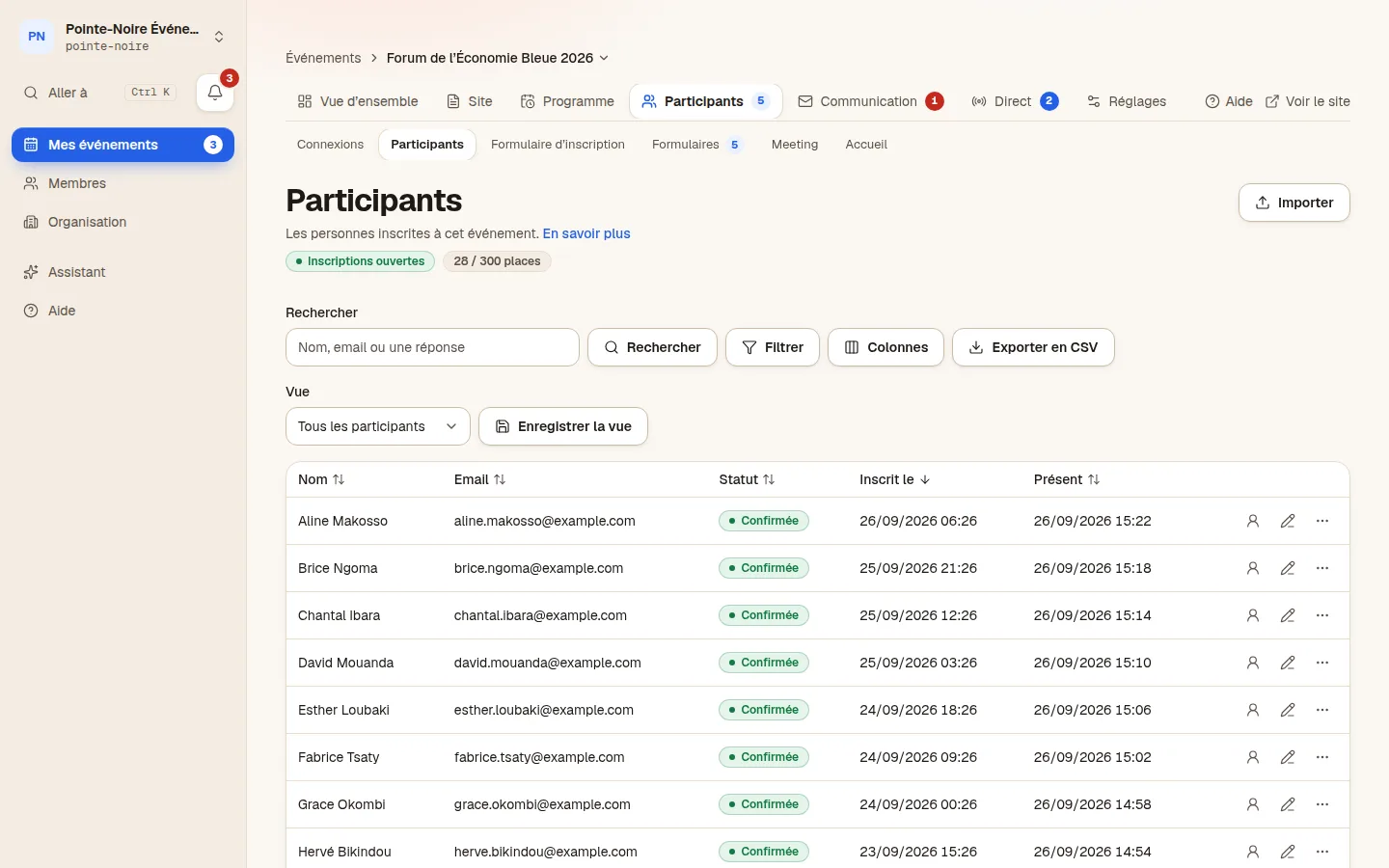
Participants. The participant list, their answers, the registrations to approve and who is present on the day.
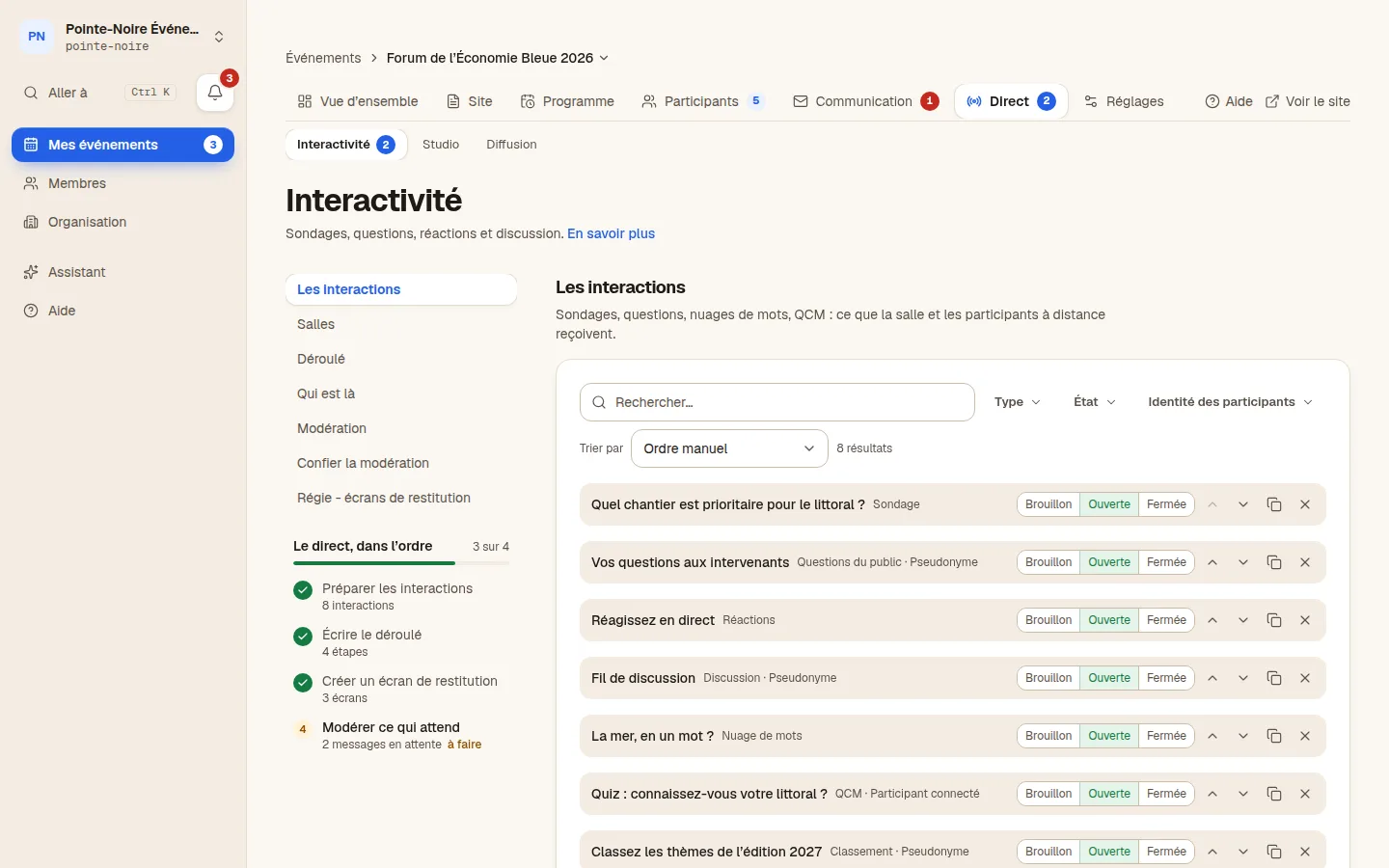
Live. The live control room: the rooms, the running order of polls and questions, and what is waiting for moderation.
Every module exists and is visible in the dashboard today. The images are drawings: nothing they show is real data.
A block builder and eight themes. Among the blocks: banner, text, image, video, gallery, venue, carousel, countdown, number cards. You compose the page, and the preview shows exactly what a visitor will see, language by language.
Sessions, speakers, rooms and days, with filters on every field. Limited-seat workshops are booked from the site, and the waiting list moves on its own when someone drops out.
A stepped form with your own fields, a capacity, and a QR badge emailed the moment it is validated. Registration is free: LiveEvent takes no payment and sells no tickets.
On the day, the front desk opens the scanner in a phone browser: a badge is shown, a name appears, and the list updates for everyone at once. Nothing to install.
Seven kinds of live interaction are launched from the dashboard and shown on the site or on a stage screen. The audience answers from a phone, with no account and no app.
Live Studio composes the picture in the browser (camera, screen share, lower thirds, remote guests) and pushes the feed to the streaming platform of your choice. No hardware control room.
Registrations over time, who actually showed up, how full each session was, form answers: you read the numbers in the dashboard and share them through a link that opens nothing else.
Every filmed room has its own video, and interaction sits right on the picture. Speakers run things from their phone, and the replay splits itself up, session by session.
Each room has its video, its running order and its current session. The audience moves from one to the next without leaving the page.
The poll, question or form on air appears on the picture, full screen included; on a phone, just below it.
From their phone, a speaker runs their own room: next moment, questions to publish, messages from the control room.
Every change of session leaves a marker. In the replay, one click on a session jumps the video to the right moment.
Email, exhibitors, Meeting, resources, automations, assistant, team: seven more modules from the dashboard, all available today.
Templates with variables, targeted campaigns, a sending log, verified senders and domains. A campaign only goes out when a person launches it.
A directory of exhibitors and partners, their booths and their contacts, tied to the event programme.
Participant profiles, meetings in person or by video, and messaging between participants, moderated only when reported.
Documents and videos reserved for participants, served through a signed link that expires after a minute.
“When this happens, do that” rules that run on their own, and connectors to the tools you already use: CRM, email marketing, analytics, ticketing.
An assistant that reads your events and drafts for you, and an MCP server to plug in the tool of your choice. Both act with your rights, never more.
Five roles, a scope per event, and sixteen features you open or close for one specific person.
One tool, four jobs. None of them needs a module bought on the side.
A programme across several days and rooms, the speakers, limited-seat workshops, badges at the door, and audience questions from the floor.
Site · Programme · Registration · Check-in · Interaction
Learn moreAn exhibitor and partner directory, meetings between participants, lead scanning on stands, and access control across several days.
Site · Exhibitors · Meeting · Check-in
Learn moreA private site, registration limited to staff, workshops to pick from, and the attendance report to hand back to management.
Site · Registration · Programme · Statistics
Learn moreA registration page, an email reminder, live streaming from the browser, and audience questions during the session.
Registration · Email · Studio · Interaction
Learn moreLanguages are switched on event by event. When a translation is missing, that text shows in the default language, so an unfinished page stays readable. Visitors get their language without picking it.
Arabic is served right to left, layout included.
LiveEvent is an event management platform published in France. One tool holds the event website, online registration, QR badges, access control on the day, live audience interaction and the final numbers. It all runs in a browser, with nothing to install and no code to write.
It is built for event agencies and teams running several events a year: every client gets a walled-off workspace, and you move between them without switching accounts.
Every organisation is isolated in the database itself, not only in the interface. Subprocessors are named, retention periods written down, and data subject rights have tools behind them.
Organisation identifier on every table, composite keys, row-level security.
Access, rectification, erasure and portability, exercised by the participant themselves.
A period per event, a notice, then automatic anonymisation.
Who does what and where, published and versioned. A data processing agreement template, sent on request.
LiveEvent is event management software that runs in a browser. It brings together the event website, online registration, QR badges, access control on the day, live audience interaction and statistics. It is aimed at event agencies and teams running several events a year.
There is no public price list. The price depends on how many events you run and how much support you want; it is quoted after a demo.
No. Registration is free and LiveEvent takes no payment. Paid ticketing is not part of the product and is not planned.
No. The site is built from blocks in the browser and published in one click; languages, the programme and the registration form are all set in the same interface, with no code to write.
Seven for the event site: French, English, Spanish, Italian, Portuguese, Arabic and Chinese. Languages are switched on per event, and Arabic is served right to left. Pages, the programme and exhibitor profiles can be translated into the event’s other languages by the AI model your organisation has set up. The dashboard is in French and English.
The database is hosted in London, United Kingdom, which holds an adequacy decision. The application is deployed on Vercel and email goes out through Resend. The full list of subprocessors and their regions is published on the Security page.
Yes. Your organisation has a subdomain, where each event has its own address. You can also point your own domain name at it, once you have proved you own it.
No, scanning needs a connection. That is a deliberate choice: each scan is recorded on the server straight away, so a badge already scanned at one entrance shows as already scanned at every other, with no conflicts to resolve afterwards.
No. The site, registration, the badge, questions and polls all run in a phone browser. The badge arrives by email.
Yes, that is how it is meant to be used. Each client is an isolated organisation, and an operator moves between them without signing in again. Roles let you give a client access to their event only.
Thirty minutes, on your next event rather than on a demo dataset. We answer by email.